Facebook vs Google Ads for Insurance Leads in 2026
Facebook and Google leads behave differently for insurance agents. Sourced 2026 cost benchmarks and the follow-up system each lead type actually needs.

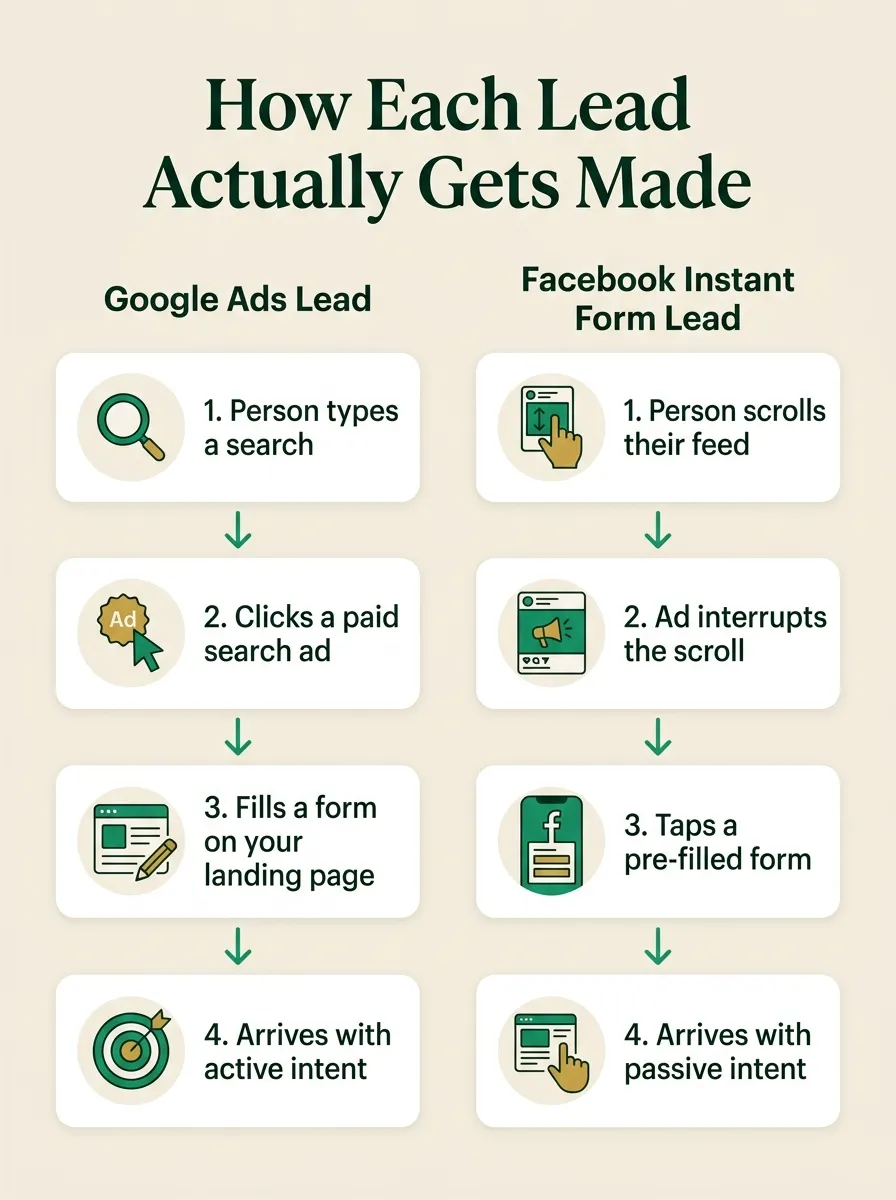
Facebook Instant Form leads and Google Ads leads are not the same product wearing two different logos, and the platform you pick matters less than what you do in the first few minutes after either one submits. A Google Ads lead has usually already typed a search query, which is active intent they generated themselves. A Facebook lead has usually just tapped a pre-filled form on an ad that interrupted their scroll, which is intent you interrupted them into. Both can write policies. Both go cold if nobody calls. The difference is how much work each one already did on its own, and that difference should change how you follow up, not whether you bother.
This matters because most agencies buy ad traffic and then run every lead through the same callback queue, regardless of where it came from. A search lead who typed “Medicare Advantage plans in my zip code” gets treated exactly like a Facebook lead who saw a stop-scroll headline and tapped without reading the fine print. That is a mistake with a real dollar figure attached to it, because you are paying real money per click on both platforms, and the follow-up gap is where that money actually gets wasted.
The short version
- Google Ads leads for Finance & Insurance carry a median cost per click of $3.39 and a median cost per lead of $74.44, per WordStream's 2026 benchmark report covering April 2025 through March 2026.
- Facebook Instant Form leads for Finance & Insurance carry a median cost per click of $1.22 and a 0.98% click-through rate, per WordStream's Facebook Ads Benchmarks 2025 report. An insurance-specific cost per lead was not published for that category in the leads-objective table.
- Meta only makes lead data available for download for 90 days after submission, and recommends connecting a CRM in real time rather than exporting manually.
- Both lead types are equally worthless if the first call happens hours later. The cost difference between the platforms is a rounding error next to the cost of a slow follow-up.
- Whether an Instant Form submission clears the TCPA consent bar for autodialed follow-up depends on your own ad and form disclosure language, not on Meta's platform.
Why a Facebook lead and a Google lead are not the same lead
A Google Ads lead for insurance almost always starts the same way: someone types a search, sees your ad among the results, clicks it, and lands on a page they chose to visit because a specific phrase you paid to rank for matched something they were already looking for. That is called search intent, and it is the single biggest reason search leads convert differently than social leads. The person did work before you ever spent a dollar on them. They opened a new tab, typed something specific, and picked your result over the others.
A Facebook Instant Form lead starts differently. Meta’s own Instant Form product is built to remove friction, not require it: the ad appears inside someone’s feed while they are doing something else entirely, usually scrolling, and if the ad’s creative and offer are compelling enough to stop the scroll, tapping it opens a form that Meta has already pre-filled with the person’s name, email, and phone number from their Facebook profile. The person did not go looking for insurance. Insurance came looking for them, mid-scroll, and the form removed almost every reason to hesitate before submitting it.
Neither mechanism is good or bad on its own. Search intent produces a smaller number of higher-intent leads at a higher cost per click. Interruption-based social ads produce a larger volume of leads at a lower cost per click, with a wider range of actual buying intent inside that volume. The mistake is assuming the second group behaves like the first group just because both showed up in the same CRM pipeline.
"Lead quality" is really "distance from intent"
A search lead already decided to look for insurance before your ad ever appeared. A social lead decided to stop scrolling for a few seconds. Both are real prospects. One of them needs you to prove your offer is worth their time faster, because they gave you less proof of their own interest to work with.
What each platform actually costs an insurance agent in 2026
Cost benchmarks for paid advertising get quoted constantly and sourced rarely. The two figures below come from WordStream by LocaliQ, which publishes an annual Google Ads benchmark report and a companion Facebook Ads benchmark report, both built from real client campaign data with a stated methodology rather than a survey of opinions.
| Metric | Google Ads (search) | Facebook Ads |
|---|---|---|
| Click-through rate | 9.83% | 0.98% |
| Cost per click | $3.39 | $1.22 |
| Conversion rate | 2.64% | Not published for this category |
| Cost per lead | $74.44 | Not published for this category |
The Google Ads figures come from WordStream’s 2026 Google Ads Benchmarks report, built from more than 13,000 search advertising campaigns across 23 industries, covering the period from April 1, 2025 through March 31, 2026, with each industry subcategory including a minimum of 52 unique active client campaigns and “averages” calculated as medians to control for outliers. The Facebook figures come from WordStream’s Facebook Ads Benchmarks 2025 report, covering April 1, 2024 through June 30, 2025, built from 554 US-based traffic campaigns and 726 US-based leads campaigns, also using medians. That report’s Finance & Insurance row appears in the traffic-objective table but not the leads-objective table, so a category-specific cost per lead for Facebook was not available from this source. Where the report did publish a figure, the overall cross-industry median cost per lead for the leads objective, combining every category, was $27.66, up 20.94% year over year. Treat that number as a directional cross-industry figure, not an insurance-specific one, because that is exactly what it is.
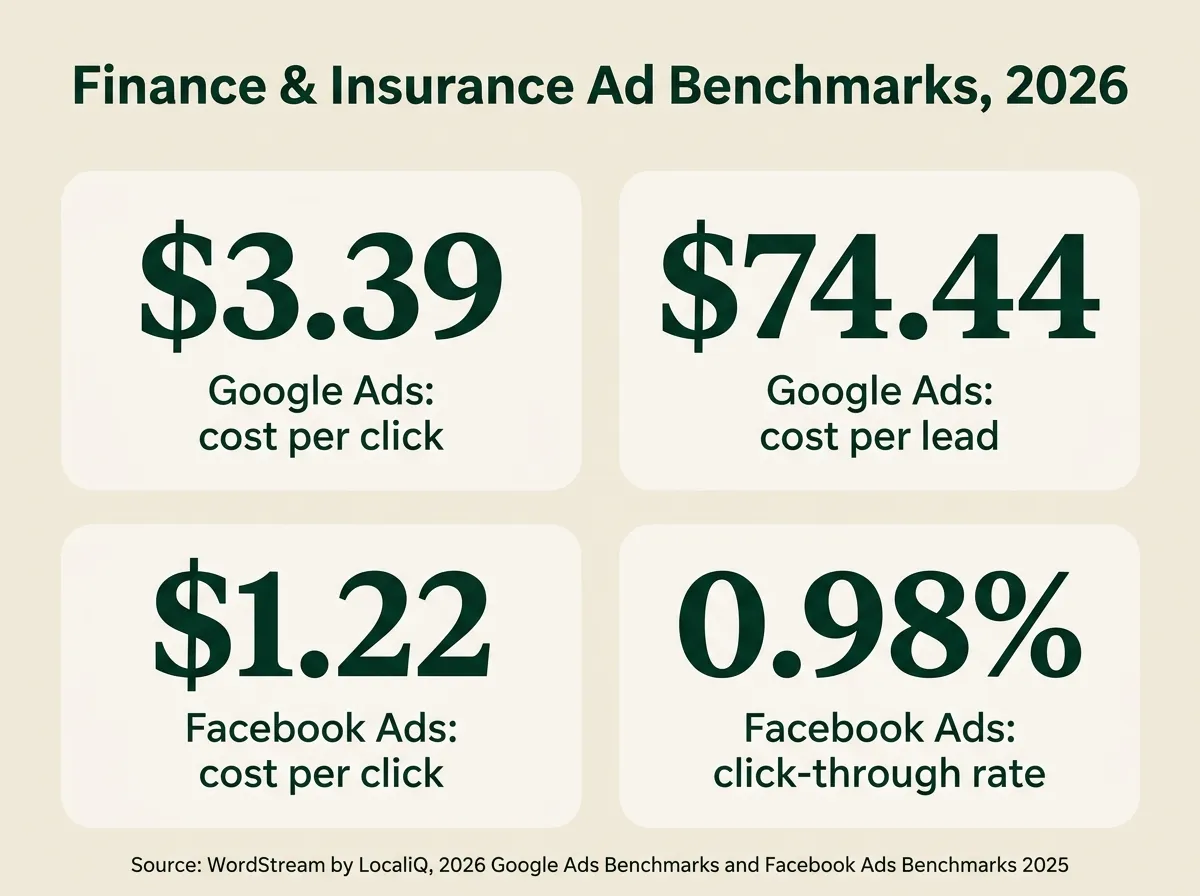
Read the table plainly: a Google search click costs almost three times what a Facebook click costs, but a much larger share of Google clicks convert into a form fill, because the person already wanted to be there. Facebook trades a cheaper click for a lower conversion rate and a colder average lead. Neither side of that trade is automatically the better deal. It depends on whether your follow-up process can turn Facebook’s volume into contacts fast enough to make the lower cost per click worth the lower intent per lead.
Why a Facebook lead goes cold faster, mechanically
Speed to lead is not a new idea, and TheAffordableAI has written about the general version of it before. What is specific to Facebook Instant Form leads is why the clock runs faster on them than it does on almost any other lead source.
Three mechanical facts explain it, and none of them require a market study to be true, because they come directly from how the product works:
The form is pre-filled, which means the person did not have to type their own name, number, or email. Typing your own contact information into a form is a small but real commitment device: it takes a few seconds of deliberate action, and people who do it have crossed a slightly higher bar than people who tap “submit” on a form Meta already filled out for them from their profile data.
The submission happens inside the scrolling session, not after it. A Google search click takes someone out of what they were doing and into a dedicated browsing session focused on your page. An Instant Form submission happens without ever leaving the feed. The next post, video, or ad is one swipe away the entire time, including the second after they hit submit.
The lead has no reason to remember submitting it. A person who searched “best Medicare Advantage plan in [their city]” typed that phrase because it mattered to them enough to type. A person who tapped a pre-filled Instant Form during a few idle seconds on the couch may genuinely not recall doing it twenty minutes later, not because they are careless, but because the entire interaction was designed to require as little conscious effort as possible.
Treat every Facebook lead like it's already forgotten you
Assume the person submitting a Facebook Instant Form will not remember doing it by the time you call, unless you call while they are still in the same scrolling session. That assumption changes how you write the opening line of the call: lead with what they asked about, not with "I saw you filled out a form," which lands as a stranger's cold open to someone who has already moved on mentally.
The real math: cost per contact, not cost per lead
Cost per lead is the number every ad platform reports back to you, and it is also the least useful number for deciding whether a campaign is working, because a lead you never reach is a lead you paid full price for and got nothing back on. The number that actually matters is cost per contact: what you spent to generate the lead, plus what it cost to actually get a live person on the phone, spread across everyone you did reach.
Here is the arithmetic using only the sourced figures above and TheAffordableAI’s own published rates, which is the kind of math you can run yourself with your own numbers.
What speed adds to a lead you already paid for
Illustrative, using this article's sourced cost-per-lead figures and TheAffordableAI's published Single Account rate of $0.20 a minute. A 4-minute average call is assumed for this example; substitute your own average call length.
Cost-per-lead figures: WordStream 2026 Google Ads Benchmarks (Finance & Insurance) and WordStream Facebook Ads Benchmarks 2025 (all-industry leads objective average; Facebook's Finance & Insurance category did not publish a leads-objective CPL). Calling cost: TheAffordableAI Single Account rate, $0.20/min, published pricing.
Look at the ratio, not the raw numbers. Calling a Google Ads lead the moment it arrives adds roughly 1% to what you already spent generating it. Calling a Facebook lead the moment it arrives adds roughly 3%, because the lead itself is cheaper, but the ratio is still trivial either way. The lead acquisition cost is sunk the instant the form submits. Whatever you spend to actually reach that person is a rounding error against what you already paid Google or Meta to get their name and number in front of you. That is the whole argument for calling fast: the expensive part of the transaction already happened, and delay just makes the odds worse without changing the price you already paid.
This is arithmetic, not a promise about your close rate. Nobody, including TheAffordableAI, can tell you what percentage of your Facebook leads will become policies, and any vendor who quotes you a specific conversion number without having run your actual campaign is guessing. What is not a guess is that the cost of speed itself, measured in calling minutes, is small next to the cost of generating the lead in the first place.
How to follow up a Facebook Instant Form lead correctly
None of this requires buying anything. You can run every step below with your own dialer, a CRM webhook, and staff you already have.
- Connect the form to a CRM or webhook that fires on submission, not on a scheduled export. Meta’s own guidance is to download leads data often or connect a CRM system in real time, specifically because manual exports leave gaps between when someone submits and when anyone on your team sees it.
- Write the opening line around what they asked about, not around the fact that they filled out a form. If your ad promoted Medicare Advantage plan comparisons, open with that, not with “I saw you were interested in insurance,” which could describe any of a dozen ads they might have scrolled past that week.
- Call before you email or text, and call within the same short window every time. A text sits in a notification queue the person may not open for hours. A call, even one that goes to voicemail, is the fastest way to put your name in front of someone who may already be scrolling past the memory of submitting the form.
- Confirm your form’s consent language before treating a submission as autodial-ready. If your ad and Instant Form disclose, in plain language the person had to agree to before submitting, that submitting authorizes automated or prerecorded calls and texts to the number provided, you likely have prior express written consent for that channel. If the form is silent on that point, route the first outreach through a live, non-autodialed call instead, and fix the form language for future campaigns.
- Log every disposition against the lead source, separately from your Google Ads leads. You cannot tell whether Facebook is working for you if its leads are mixed into the same undifferentiated pipeline as everything else.
- Download or sync your Facebook leads well inside Meta’s 90-day window. That window exists for data retention, not for pacing your follow-up, and it should never be the reason a lead goes unworked. Ninety days is Meta’s outer limit for accessing the data at all, not a guideline for how soon to call.
How to follow up a Google Ads lead correctly
A search-intent lead earns a different opening, because they already told you, in their own words, what they were looking for.
- Pull the actual search query or landing page they converted from, and reference it on the call. Someone who searched “Medicare Advantage dental coverage [city]” wants to hear that phrase reflected back, not a generic script.
- Still call fast. Higher intent does not mean infinite patience. A search lead who does not hear back within a reasonable window starts clicking on the next result in the same search they ran to find you.
- Treat the landing page’s disclosed consent language as your compliance baseline, the same as the Instant Form check above. A Google Ads lead who fills out a form on your own site is subject to the same TCPA consent analysis as any other web-generated lead.
- Route Medicare-specific search leads through your CMS-compliant workflow, including the TPMO disclaimer and call recording covered in TheAffordableAI’s CMS 2027 Medicare rules guide, regardless of how much higher-intent the search click felt.
| Situation | Better starting point |
|---|---|
| You need volume to keep a team of agents busy | Facebook, if your follow-up can handle same-minute calling |
| You have a small team and need fewer, higher-intent conversations | Google Ads, accepting the higher cost per lead |
| Your current follow-up process takes hours to reach a new lead | Neither, until the follow-up gap is fixed first |
| You want to test a new market or ZIP code cheaply | Facebook, because the lower cost per click limits the downside of a bad test |
Before and after: the same 200 monthly leads, worked two different ways
Leads sit in a shared inbox or spreadsheet
- Facebook and Google leads mixed into one undifferentiated queue
- Someone checks the queue a few times a day, not the moment a lead arrives
- Facebook leads treated with the same script as high-intent search leads
- No record of how long each lead sat before the first call attempt
UnknownActual time from form submission to first call
Both platforms fire straight into a calling system
- Facebook Instant Form and Google Ads leads routed separately, each with its own opening script
- Outbound call attempted within the same session the lead submitted, day or night
- Consent language confirmed on the form before automated calling begins
- Every disposition logged back to the CRM, by source, so the two platforms can actually be compared
MeasuredA real, source-by-source contact rate you can act on
Where TheAffordableAI fits
Picking a platform and writing a better opening line solves part of this. The other part is capacity: a Facebook campaign that works can generate more form submissions in an hour than a small team can call back same-day, and a Google Ads campaign that ramps up over an AEP push can do the same thing to a licensed agent’s calendar. TheAffordableAI is built to sit on the receiving end of either lead source: it connects to the CRM the leads land in, dials outbound the moment a new record appears, and hands a live prospect to a licensed agent through a warm transfer instead of leaving them in a queue.
Outbound on lead creation, not on a schedule
Fires when a new Facebook or Google Ads lead lands in the CRM, not when someone next opens the inbox.
Warm transfers and auto-booking
A reached lead gets connected to a licensed agent live, or booked against real calendar availability, instead of parked as a note.
Native HighLevel CRM sync
Ad-platform leads that already flow into HighLevel can trigger outbound calling without a separate integration project.
Number warmup and spam defense
A campaign spike in outbound volume is exactly the scenario that gets a number flagged without a standing warmup routine.
Hear how a lead-generated call actually sounds
There is a live demo call on the homepage. Listen to it before deciding whether your Facebook and Google leads need a faster follow-up system than the one you have now.
Pricing is published, not quoted privately: a Single Account runs $200 a month plus a $500 one-time setup fee, at $0.20 a minute, down to $0.15 a minute at bulk volume. An Agency plan runs $500 a month plus a $1,000 one-time setup fee, at $0.18 a minute, down to $0.16 a minute at bulk. Both are month to month with no long-term contract, so testing this against your own Facebook or Google campaign costs, at most, one month either way. If you are already running leads into HighLevel, the sync is usually the first thing agencies ask about, and it is covered on the how it works page.
What you get from fixing this, concretely
You do not get a promised conversion rate, and anyone who tells you otherwise is not being straight with you. What you get is a measurable, source-by-source contact rate: a real number for how many of your Facebook leads and how many of your Google leads actually get a live conversation, instead of a guess based on whatever the ad platform’s dashboard reports. You get an opening line that matches what the lead actually did, instead of one generic script for every source. You get a calling capacity that does not buckle the day a campaign spikes. None of that is exciting to say out loud, and all of it is the actual difference between an ad budget that pays for itself and one that quietly leaks.
When paid ads are the wrong tool
It is worth saying plainly: if your agency writes fewer than a handful of policies a month from referrals and warm relationships already, adding a paid Facebook or Google campaign on top of a follow-up process that cannot handle same-day calling is very likely to lose money before it makes any. The math above only works if the calling capacity exists to act on the lead fast. A campaign that generates 40 leads a week into a queue nobody touches until Friday is not a lead-generation problem, it is a follow-up problem wearing a lead-generation costume, and buying more traffic will not fix it. Fix the follow-up gap first, on whatever leads you already have, and only then decide whether the platform you add on top is Facebook, Google, or neither.
The compliance layer
Using AI does not transfer liability
A faster follow-up system is an operational advantage, not a transfer of licensing responsibility. Automated or prerecorded calls to a cell phone still require prior express written consent under the TCPA, and that consent has to come from your own ad and form disclosures, not from the fact that a platform generated the lead. The caller must disclose it is an AI where required, honor opt-outs immediately, and, for Medicare Advantage or Part D leads specifically, follow CMS's TPMO disclaimer and call-recording requirements on top of everything else. The status of the FCC's one-to-one consent rule for third-party lead generators, which the Eleventh Circuit vacated in January 2025, is covered in full in TheAffordableAI's aged insurance leads guide. Whether you use AI, a live agent, or both, the licensed agent and agency remain responsible for consent, disclosure, and DNC compliance. That responsibility does not move.
Facebook and Google are not competing for the same kind of attention, and the leads they generate are not the same product. A search click already told you what someone wants. A social click told you they stopped scrolling for a second. Both are worth calling, and both are worth calling fast, and the platform you spend more of your budget on should depend on how much volume your follow-up process can actually absorb same-day, not on which one has the lower cost per click on a benchmark report. Run the numbers above with your own campaign data, pick the platform that matches your calling capacity, and fix the follow-up gap before you add more spend on top of it.
Frequently asked
Are Facebook Instant Form leads worse than Google Ads leads for insurance?
They are not worse, they are earlier in the buying process. A Google Ads lead has typically already typed a search query like "Medicare Advantage plans near me," which is an active, self-directed signal of intent. A Facebook Instant Form lead usually comes from someone scrolling their feed who stopped on an ad and tapped a pre-filled form, which is a passive, interrupted signal. Neither is inherently a bad lead. The difference is that a Facebook lead has done less to prove interest on their own, which means the burden of proving your offer is worth their time shifts almost entirely onto how fast and how well you follow up.
How fast do I need to call a Facebook lead ad submission?
As close to instantly as your process allows, and definitely within the same session the person is still on their phone. There is no single, sourced industry number for exactly how many minutes a Facebook lead stays warm, and this article does not invent one. What is documented is the mechanism: an Instant Form submission happens without the person leaving the app or actively searching for you, so the moment of intent is thin and easily overwritten by the next thing in their feed. Treat the first few minutes after submission as the whole opportunity, not a suggestion.
Does a Facebook Instant Form submission count as TCPA consent to autodial the lead?
It can, but only if the ad and form actually disclose that submitting it authorizes automated or prerecorded calls and texts to the number provided, using clear language the person agreed to before they hit submit. A vague form that just asks for a name and phone number without that disclosure does not automatically clear the prior express written consent bar under 47 CFR 64.1200. This is a question about your own form and ad copy, not about Meta's platform, so the honest answer is to check what your specific Instant Form actually discloses before assuming every submission is autodial-ready. When in doubt, route the first outreach through a channel that does not require prior express written consent, such as a live, non-autodialed call.
What does a Google Ads lead cost for insurance agents in 2026?
WordStream's 2026 Google Ads Benchmarks report puts the Finance & Insurance category's average cost per click at $3.39 and its average cost per lead at $74.44, based on data from April 1, 2025 through March 31, 2026 across more than 13,000 search campaigns. That figure is a cross-agency median, not a quote for any specific agent's account, and your own cost per lead depends heavily on your market, your keywords, and your landing page.
What does a Facebook lead cost for insurance agents in 2026?
The same WordStream benchmark work, published as the Facebook Ads Benchmarks 2025 report covering April 1, 2024 through June 30, 2025, puts the Finance & Insurance category's average cost per click at $1.22 with a 0.98% click-through rate. That report does not break out a Finance & Insurance-specific cost per lead in its leads-objective table, only in the traffic-objective table, so a reliable insurance-specific Facebook cost-per-lead figure was not available from this source at the time of writing. The report's cross-industry average cost per lead for the leads objective, all industries combined, was $27.66, which is a directional number, not an insurance-specific one.
How long do I have to download a lead from Meta before it disappears?
Meta's own Business Help Center states that lead data is available for download for 90 days from the moment the form is submitted, and that leads become unavailable after that window closes. Meta's guidance is to download leads data often or connect a CRM system in real time rather than relying on periodic manual exports, which matters far more for the first few minutes of a lead's life than for anything at the 90-day mark.
Should I use Facebook or Google Ads for Medicare leads specifically?
Either can generate Medicare Advantage or Part D interest, but Medicare marketing carries CMS rules on top of whatever the ad platform requires, including the TPMO disclaimer and mandatory call recording, regardless of whether the lead came from a Google search or a Facebook form. That layer is covered in full in TheAffordableAI's CMS 2027 Medicare rules guide. Pick the platform based on cost and lead volume in your market, then apply the same CMS compliance layer to every Medicare lead no matter where it came from.
Can an AI caller call a lead the moment it fills out a Facebook or Google form?
Yes, when the lead is routed through a CRM integration or webhook that fires on submission rather than sitting in a spreadsheet someone checks later, an outbound AI caller can be triggered immediately. That is the entire point of connecting either ad platform to a system built for speed rather than batch processing. It does not remove the consent and disclosure requirements above; it just means the call that should happen fast can actually happen fast.
Sources
- WordStream by LocaliQ — Google Ads Benchmarks 2026: Competitive Data & Insights for Every Industry (Finance & Insurance category; data period April 1, 2025 to March 31, 2026)
- WordStream by LocaliQ — Facebook Ads Benchmarks 2025: New Data, Trends & Insights for Your Industry (Finance & Insurance category; data period April 1, 2024 to June 30, 2025)
- Meta Business Help Centre — About expired leads (90-day lead data download window)
- United States Court of Appeals for the Eleventh Circuit — Insurance Marketing Coalition Limited v. FCC, No. 24-10277 (decided January 24, 2025)
- TheAffordableAI — Pricing
Put this on your own phone line
See the AI dial, qualify, and warm-transfer a live call in under a minute. No contract, no dev work.
Keep reading

Speed to Lead in 2026: Why the First 60 Seconds Decides Who Writes the Policy
The lead you paid for is not lost to a better agent. It is lost to a faster one. Here is what response time actually does to contact and conversion rates, and how to get to sixty seconds without hiring a dialer team.

Cost Per Call: Live Agent vs AI Voice Agent in 2026
AI voice agents run about $0.07 to $0.50 a minute in 2026, versus $0.75 to $1.40 for a US live agent. Here is the real cost-per-call math, by volume.

GoHighLevel Insurance Workflows: Trigger to Warm Transfer
Most GoHighLevel insurance workflows stop at 'assign the lead.' Here's the trigger-to-warm-transfer build, GHL's own docs, and where TCPA rules bite.