GoHighLevel Insurance Workflows: Trigger to Warm Transfer
Most GoHighLevel insurance workflows stop at 'assign the lead.' Here's the trigger-to-warm-transfer build, GHL's own docs, and where TCPA rules bite.

A lead comes in through a Facebook form, hits your GoHighLevel pipeline, and a workflow you built eight months ago fires an internal notification. It lands in one person’s queue. That person is on a call, or at lunch, or out sick, or simply the same rep every lead has landed on since the day you built the automation and never opened it again. Nobody else knows the lead exists. The workflow did exactly what you told it to do. It just was never told what to do when the one person it notified didn’t answer.
That’s not a broken CRM. It’s a workflow that has one job — get the lead to a human — and stops the instant that handoff fails once. We’ve written before about why the first few minutes of a lead’s life matter more than almost anything else an agency does; see the speed-to-lead breakdown for the data on how fast contact rates fall off. This article is about the machinery that’s supposed to make that first contact happen automatically, and where it quietly stops.
The short version
- A GoHighLevel workflow is a trigger plus filters plus actions. Most insurance agencies build the trigger and the first action, then stop before the part that handles a non-response.
- HighLevel's own documentation describes round-robin assignment as a five-minute setup: a Contact Created trigger, an Assign User action set to multiple users with the split at "equally," and a notification step. It does not include an escalation path by default.
- Two federal rules govern any automated calling workflow regardless of which CRM triggers it: the TCPA's consent requirement (47 CFR 64.1200) and the FTC's 3% call-abandonment safe harbor (16 CFR 310.4(b)(4)).
- An AI voice agent can close the exact gap a notify-and-hope workflow leaves open — but it doesn't fix a missing consent record, and it isn't a substitute for the licensed conversation that has to happen after the transfer.
What Actually Happens Inside an Unmonitored GoHighLevel Pipeline?
A pipeline doesn’t lose leads on its own. It loses them at the exact moment an automation’s last defined step finishes and nothing was built to run next. In GoHighLevel’s own architecture, that boundary has a name: a workflow is a trigger (an event that starts it), one or more filters (conditions on tags, custom fields, or pipeline stage that decide who qualifies), and a chain of actions (assign a user, send a message, wait, book an appointment, add a tag). HighLevel’s support documentation groups triggers into 13 categories — Contact, Events, Appointments, Opportunities, Payments, Ecommerce, IVR, and more — each one a different door a contact can walk through into an automation.
The most common door for an insurance lead is Contact Created, which HighLevel’s own article on the trigger describes plainly: it fires when a new contact record is added through a form, an API integration, or manual entry, and it deliberately does not fire on bulk imports, so it won’t flood a workflow when you upload an old list. That’s the right behavior for a live lead. The problem isn’t the trigger. It’s what agencies chain to it.
A quick vocabulary check, because these terms get used loosely and it matters which one you’re actually building against. A contact is the person record itself — name, phone, email, custom fields. An opportunity is that contact’s position inside a pipeline, a defined set of stages like “New Lead,” “Contacted,” “Quoted,” “Closed.” A smart list is a saved filter on top of your contacts — everyone tagged “Medicare,” everyone with no activity in 30 days — that you can point a bulk action or a reporting view at without rebuilding the filter each time. A workflow doesn’t require a pipeline at all; it can run purely off contact and tag events. Most insurance builds use both together: the pipeline shows a human where a lead stands at a glance, and the workflow is what actually moves it, silently, in the background.
Where Do Insurance Leads Actually Enter This Pipeline?
They enter from wherever the money was spent to generate them, and the entry point changes what the workflow needs to check before it does anything automated. A Meta lead ad submits through Facebook’s native lead-form integration or a webhook into GoHighLevel — fast, low-friction for the prospect, and frequently thin on what it actually captured about consent for automated follow-up. A Google Local Services ad or a Google Ads call-tracking number often creates the contact from an inbound call event rather than a form, which means the “written consent for automated contact” question doesn’t even apply the same way, because the prospect called first. A shared aggregator lead arrives via API, usually with its own consent language baked into the aggregator’s own opt-in flow — which you did not draft, cannot see, and are nonetheless relying on.
The entry point is a data problem, not a workflow problem
Some agencies solve this by capturing a consent certificate at the point of form submission — a timestamped, hashed record of exactly what checkbox language the prospect saw and confirmed, independent of the CRM. Whatever mechanism you use, tag the contact with what kind of consent exists before a workflow decides whether to fire an automated touch. Building that tag once, at intake, is cheaper than reconstructing it after the fact.
This is exactly why the filter step in the table above matters more than it looks like it should. A workflow that treats a Google LSA inbound call, a Meta lead-ad submission, and a shared aggregator record identically — same trigger, same automated SMS, same predictive dial — is treating three different consent postures as one. Building a tag for lead source at intake, and branching the workflow on it, is a half-hour of setup that closes most of the exposure described in the compliance section below.
| Building block | What it does | Where agencies typically stop |
|---|---|---|
| Trigger: Contact Created | Fires the moment a new contact enters the system from a form, API, or manual entry — not on bulk imports | Built correctly almost everywhere; rarely the failure point |
| Filter: tag / custom field | Narrows the automation to contacts matching a condition — lead source, product line, consent status | Often missing entirely, so every lead runs the same generic path regardless of product or consent state |
| Action: Assign User (round robin) | Distributes the contact across multiple selected users with the traffic split set to equally | Frequently set to a single user instead of a group — a round robin of one |
| Action: Internal Notification | Alerts the assigned user through SMS, email, or in-app, scoped to whoever the lead was actually assigned to | This is usually the last step in the chain — the workflow ends here |
| Wait step + branch (if/else) | Pauses for a defined window, then checks a condition — did the assigned user respond? — and branches accordingly | Almost never built; there is no automated answer to "what if nobody called back" |
| Action: Book Appointment | Books against a calendar's live availability, including round-robin calendars that spread bookings across a team | Usually only reachable if a human manually gets that far — nothing routes there automatically on non-response |
Read that table top to bottom and the pattern is obvious: everything through “Internal Notification” is a solved problem. Everything after it is where the lead actually gets qualified, booked, or handed to a licensed agent, and it’s the part almost nobody automates, because it’s the part that requires deciding what “the lead didn’t get worked” should trigger next.
Why Do These Workflows Break Down Specifically for Insurance Agencies?
They break down because insurance lead volume and insurance compliance requirements collide inside the same automation, and most workflow builds were designed with the volume problem in mind and the compliance problem as an afterthought. A workflow that assigns and notifies solves distribution. It does nothing about consent, disclosure, or the record-keeping a regulator will ask for if either one goes wrong.
Start with consent, since it’s upstream of everything else. Under 47 CFR 64.1200(a)(1), initiating any call or text using an automatic telephone dialing system or an artificial or prerecorded voice requires the prior consent of the called party, and for marketing calls to a wireless number, 64.1200(f)(9) requires that consent to be in writing and to specifically authorize automated or prerecorded contact. A workflow that fires an automated SMS or a prerecorded voicemail drop the instant a contact is created is doing exactly what it’s supposed to do mechanically — and it’s a live TCPA exposure if the lead source behind that contact never captured written consent for automated contact in the first place. GoHighLevel can’t verify that for you. It will run the workflow on the contact record it’s given, consent or not.
The workflow isn't the compliance layer — the intake is
A round-robin assignment and a well-timed SMS don't create consent, and they don't undo its absence. If a lead source can't show you how it captured prior express written consent for automated contact, tag those contacts to route to a human-initiated call path, not an automated one, until that's fixed.
Then there’s volume itself, which is where the FTC’s abandoned-call rule enters. The Telemarketing Sales Rule’s safe harbor for predictive dialers, at 16 CFR 310.4(b)(4), caps the abandonment rate at 3% of all calls answered by a person, measured over a rolling 30-day period, and defines an abandoned call as one where a live representative doesn’t connect within two seconds of the person’s greeting. That rule exists because predictive dialers, by design, dial more numbers than there are reps available to answer them the instant someone picks up — it’s the entire mechanism that makes a predictive dialer efficient, and the entire mechanism that can violate the rule if the ratio is tuned wrong. A GoHighLevel workflow that fans outbound dials out to a list without a receiving agent — human or AI — ready inside that two-second window is running exactly the scenario this rule was written to catch, regardless of which platform initiated the dial.
A round robin that lives in a spreadsheet is not a round robin. It's a rumor about who's supposed to answer.
— The gap between building a workflow and monitoring oneWhat Does a Broken Handoff Actually Expose You To?
It exposes you to two different kinds of cost, and agencies usually only track one of them. The first is the lead cost you already know: a contact that sits unassigned, or assigned to someone who never calls, produces nothing on a purchase you already made. The second is less visible and considerably larger per incident — regulatory exposure from a workflow that automated its way past a consent gap or an abandonment threshold, because nobody was watching the mechanics closely enough to notice.
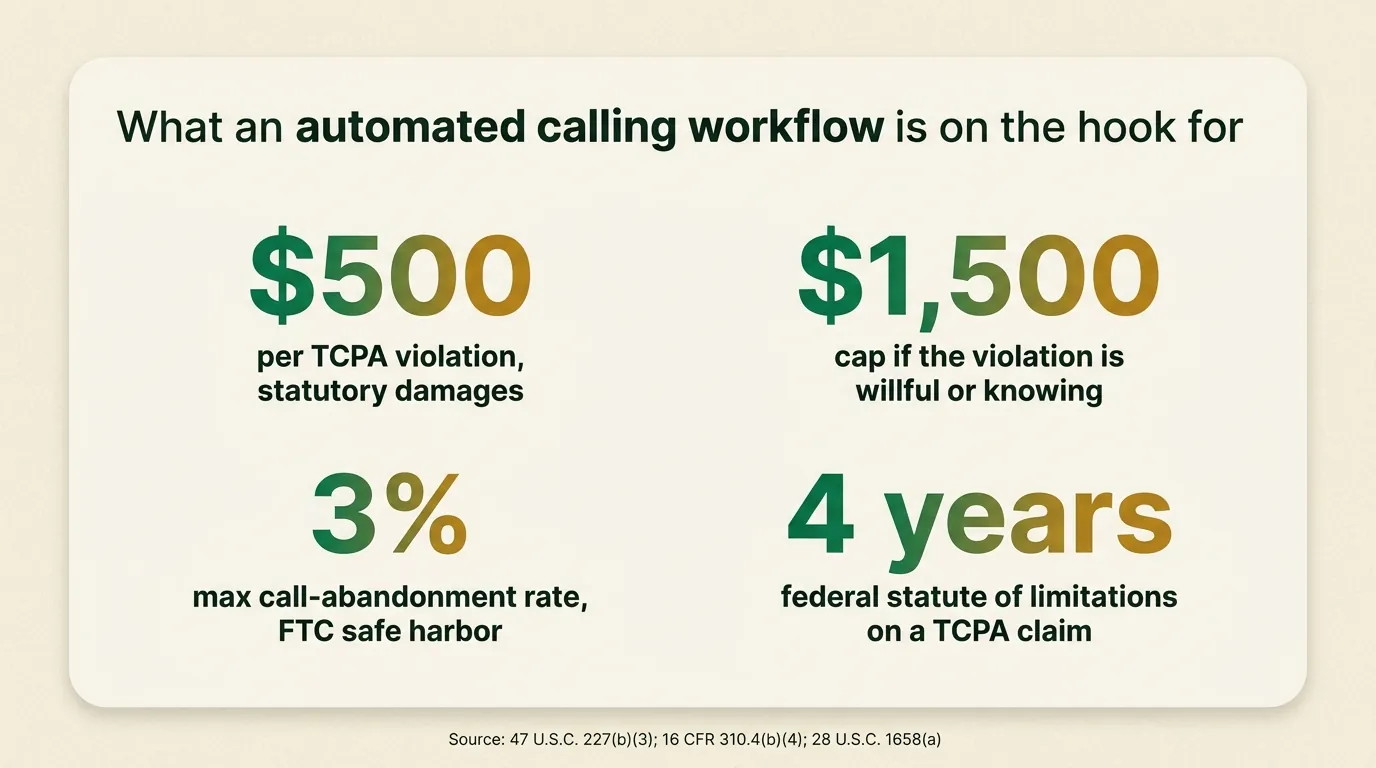
Under 47 U.S.C. § 227(b)(3), a TCPA violation carries statutory damages of $500 per violation, or actual damages if higher, and a court can treble that to as much as $1,500 per violation if the conduct was willful or knowing. That figure attaches per call or text, not per campaign and not per person contacted once. A workflow that sends an automated SMS to a list of 50 contacts without valid consent behind each one isn’t one violation — it’s potentially 50, and the arithmetic on that is not abstract.
What a consent gap in an automated workflow can multiply into
Illustrative arithmetic on the TCPA's statutory damages cap for willful or knowing violations — not a real settlement, a real case, or a prediction. Each call or text is its own violation.
Figures are 10 / 50 / 100 multiplied by the $1,500-per-violation willful-conduct cap under 47 U.S.C. § 227(b)(3) — simple multiplication of a cited statutory figure, not an independent statistic. Courts have discretion on whether to award the willful cap at all.
$500
Statutory damages per TCPA violation, or actual loss if higher
Source: 47 U.S.C. § 227(b)(3)
$1,500
Cap per violation if the conduct was willful or knowing (3x)
Source: 47 U.S.C. § 227(b)(3)
3%
Maximum call-abandonment rate under the FTC's predictive-dialer safe harbor
Source: 16 CFR 310.4(b)(4)
4 yrs
Federal statute of limitations on a TCPA claim, and it resets with every new violation
Source: 28 U.S.C. § 1658(a)
The TCPA has no enumerated statute of limitations of its own, so courts apply the general federal catch-all at 28 U.S.C. § 1658(a): four years from when a cause of action accrues, and because each individual call or text is its own violation, each one starts its own four-year clock. That’s a long tail on a workflow that was set up once and never audited. The exposure doesn’t expire just because the automation has been running quietly for a year.
Here’s a worked illustration, with hypothetical numbers you should replace with your own agency’s actual figures before drawing any conclusion. Say a workflow assigns 200 new contacts a month, and — purely as an illustration, not a sourced figure — 5% of them arrived through a lead source whose consent language turns out not to cover automated contact, a gap nobody noticed because the workflow doesn’t check for it. That’s 10 contacts a month receiving an automated SMS or voicemail drop they may not have validly consented to. Over a single quarter, that’s 30 contacts, each one a separate potential violation under § 227(b)(3). The point of the exercise isn’t the specific numbers; it’s that the two inputs which matter — your actual automated-contact volume and your actual consent-capture rate by lead source — are both things you can pull from your own CRM this week, and most agencies never have.
How Do You Actually Build the Trigger-to-Warm-Transfer Workflow?
Build it the way HighLevel’s own support documentation describes the round-robin pattern, then keep going past the point where most agencies stop. None of the individual steps below require anything beyond what’s already in a standard GoHighLevel workflow builder.
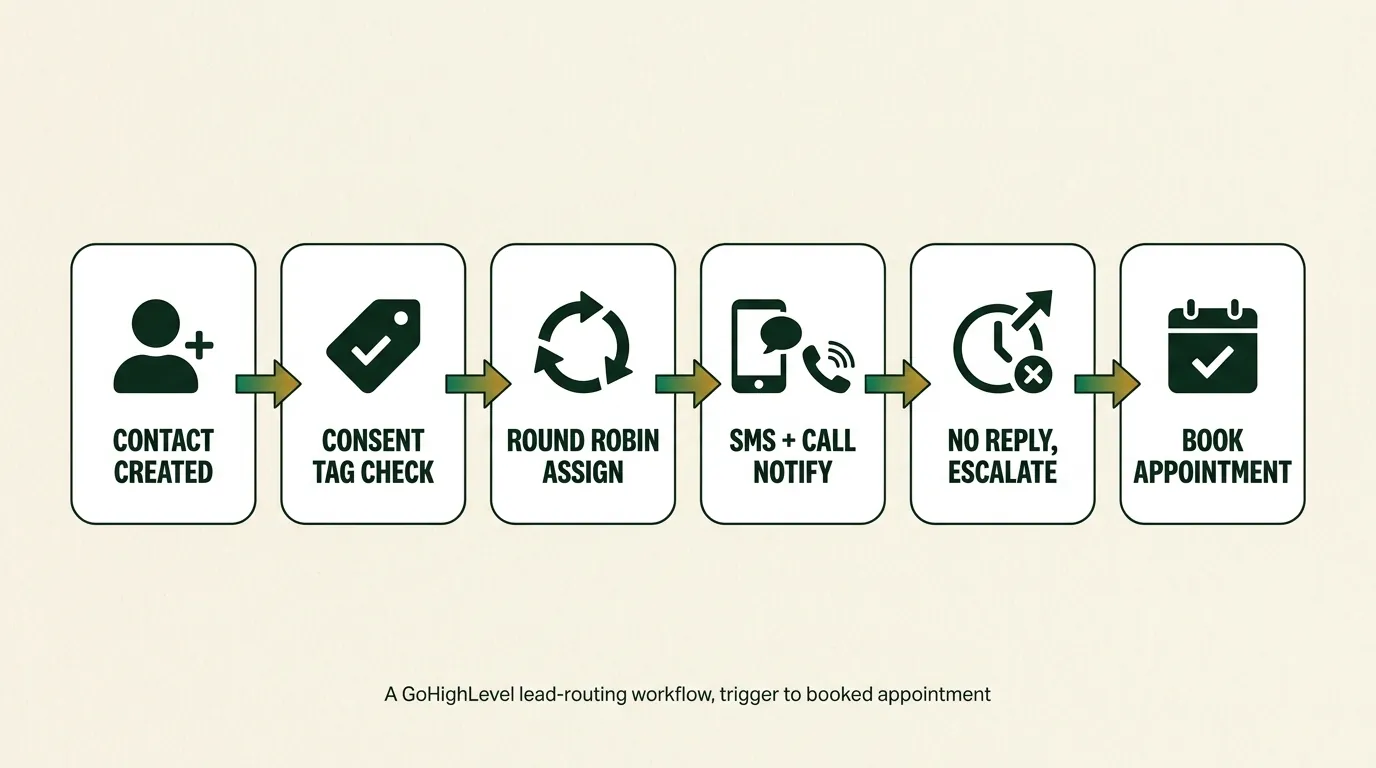
- Trigger on Contact Created, filtered to the pipeline or source that represents a live insurance lead — not a bulk import, not a newsletter signup. HighLevel’s documentation on this trigger confirms it fires per-contact, from a form or API, and specifically excludes bulk-imported records, so it won’t misfire on list uploads.
- Add a filter for consent status before anything automated happens. Tag contacts at intake based on what the lead source actually captured — written consent for automated contact, or consent for human-initiated contact only — and branch the workflow on that tag. This is the step almost every workflow skips, and it’s the one the compliance exposure in the previous section actually lives in.
- Assign the contact with round-robin distribution. HighLevel’s own guide for automatic assignment describes this directly: use the Assign User action, select multiple users from the team instead of one, and set “split traffic” to “equally.” That’s the whole mechanic — the failure mode is skipping the “multiple users” step and leaving one name in the field.
- Fire an Internal Notification scoped to the assigned user, not the whole team, so the person who owns the lead knows immediately and nobody assumes someone else is handling it.
- Add a wait step with a real timeout — 10 or 15 minutes is a reasonable start — followed by a branch: did the contact’s stage change, or did a disposition tag get added? If not, escalate. Route to a second user, a manager, or an automated calling path instead of letting the workflow simply end.
- Book against a round-robin calendar, not a single agent’s calendar, so an appointment can land on whoever is actually available rather than stalling because the first-assigned rep’s calendar is full.
- Tag the disposition when the call happens, whoever or whatever handles it, so the next automation — a nurture sequence, a renewal reminder, a database reactivation campaign months later — has an accurate starting point instead of a contact record that says nothing happened.
The full list of what’s included on a managed calling plan, including the HighLevel sync piece specifically, is on the features page if you want the complete rundown rather than the summary here.
An agency owner who reads that list and thinks “I could build this myself in an afternoon” is right. The steps are documented, the actions exist in the platform already, and nothing above requires a developer. What it does require is someone deciding, in advance, what “nobody answered” should trigger — and then someone checking, every week, that the escalation branch is actually catching contacts instead of quietly reassigning them to the same rep who missed them the first time.
Audit your own workflow before building a new one
Open every workflow touching new leads and check the "Assign User" action specifically. If it lists one name instead of a group, it isn't a round robin — it's a single point of failure with a friendlier name. Then check whether a wait-and-escalate branch exists after the notification step. If the workflow ends at "notify," that is the exact gap this article is about.
Where Does an AI Voice Agent Actually Fit Into This?
It fits at exactly the step most GoHighLevel workflows leave to chance: what happens the instant a trigger fires, before any human has had a chance to see the notification, let alone act on it. An AI voice agent wired into the same Contact Created trigger dials the lead itself, live, while the round-robin assignment and internal notification are still running in parallel — so the gap between “the lead exists” and “somebody is talking to them” stops depending on whether the assigned rep happens to be at their desk.
Fires off the same trigger
A Contact Created event can hand the lead to a managed AI caller the instant it's created, running alongside — not instead of — your existing assignment workflow.
Warm transfer respects the round robin
Once qualified, the call routes to whoever the round robin actually assigned, live, instead of dropping a voicemail note into a queue nobody's watching.
Books against real calendar availability
Multi-calendar intent routing checks who's genuinely free before booking, so the appointment doesn't collide with the same full-calendar problem a manual booking would hit.
Disposition and transcript sync back automatically
Native HighLevel CRM sync writes the tag, the transcript, and the disposition to the contact record the moment the call ends — the escalation branch has real data to check against.
Round-robins across the whole team
An Agency plan routes to 20+ agents at once, so the AI caller's warm transfer distributes the same way your workflow's Assign User action does — evenly, not to whoever set it up.
Number warmup runs underneath it
The added call volume from automated outbound doesn't get the number flagged, because warmup and spam defense are running as a standing routine, not a one-time setup step.
If you want to hear what that actually sounds like before deciding anything, there’s a demo call on the homepage: theaffordableai.com. Put your own number in and it calls you back in seconds — the same trigger-to-call mechanic described above, just aimed at you instead of a lead.
A warm transfer here means the same thing it means anywhere else in this business — a live handoff where the prospect is confirmed interested and qualified before being connected, not a voicemail drop or a callback note. We’ve covered why that distinction is the whole game in more depth elsewhere; inside a GoHighLevel workflow, it’s the difference between an escalation branch that actually reaches someone and one that just adds another notification to a queue nobody’s clearing.
What it doesn’t do is replace the licensed conversation. An AI voice agent can qualify, disclose what it is, check consent status, and route a warm transfer or a booked appointment — it cannot give insurance advice, recommend a plan, or complete a sale, and it shouldn’t be asked to. That part of the workflow still ends at a human, every time, which is exactly where GoHighLevel’s own Assign User action was always supposed to send the lead in the first place.
You can also build a version of the calling piece yourself with a dialer and a VA sitting on the notification queue full-time. Plenty of agencies do exactly that. It’s worth pricing both before deciding, because the honest comparison isn’t “automation versus nothing” — it’s the workflow you already built, running the way it was designed to, versus paying someone to make sure it never silently stalls.
The math above uses $0.20 a minute because that’s what a Single Account costs as of this writing — $200 a month plus a $500 one-time setup, stepping down to $0.15 a minute at higher volume. An Agency plan runs $500 a month plus a $1,000 one-time setup at $0.18 a minute, stepping down to $0.16, and adds the round-robin distribution across 20-plus agents described above. Run it against your own call volume and average handle time rather than taking either number on faith.
What Do You Get Once the Workflow Actually Runs Itself?
Close the gap between “trigger fired” and “human engaged,” and the change shows up in specific places rather than as a vague promise about pipeline health. Every new contact gets a live attempt at contact within the window that matters, not just an internal notification that depends on someone checking their phone. The round robin distributes the way it was designed to instead of defaulting to whoever set the workflow up originally. A disposition tag lands on the contact record whether a human or an AI handled the call, so every downstream automation — nurture, renewal, reactivation — starts from an accurate state instead of a blank one. And the consent and recording trail exists on every automated touch, because the workflow was built to check for it rather than assume it.
None of that is a claim about close rates or income, and it shouldn’t be read as one. It describes what changes mechanically when a workflow’s last defined action stops being “notify one person and hope.”
What Compliance Rules Actually Govern an Automated Workflow Like This?
They’re the same two rules that governed manual calling before any of this was automated — automation doesn’t create new exceptions, it just makes the existing rules easier to violate at scale if nobody’s checking.
| Rule | Citation | What it requires of the workflow |
|---|---|---|
| TCPA prior express written consent | 47 CFR 64.1200(a)(1), (f)(9) | A signed, specific authorization for automated or prerecorded contact to a cell number, captured before the workflow ever fires an automated touch |
| FTC abandoned-call safe harbor | 16 CFR 310.4(b)(4) | No more than 3% of answered calls go unconnected to a live rep within 2 seconds, measured on a rolling 30-day basis, for any predictive-dialing technology |
| TCPA statute of limitations | 28 U.S.C. § 1658(a) | Four years of exposure per violation — a reason to retain consent records at least that long, not a deadline that lets old gaps expire quickly |
| CMS TPMO recording and disclosure | CMS Medicare Communications and Marketing Guidelines | Full call recording retained for 10 years, and the TPMO disclaimer delivered before Medicare plan benefits are discussed, on every marketing or sales call |
Using AI does not transfer liability
Whether a call is placed by a human, dialed by a predictive system, or handled by an AI voice agent, the consent obligation, the disclosure requirement, and the licensed agent's responsibility for anything that constitutes advice or a sale stay exactly where they were. A faster workflow does not move the liability; it just moves the timeline. This is general information, not legal advice — confirm current requirements against the sources above and your compliance counsel before changing your workflow or calling practices.
What About Contacts Already Sitting in the CRM?
A trigger-to-warm-transfer workflow only fires on new contacts, which means every lead that entered before you built it is sitting outside the automation entirely — assigned once, worked once, and otherwise untouched. That’s a different problem from the one this article has focused on, and it deserves its own fix rather than a bolt-on to the new-lead workflow: a separate, scheduled workflow that pulls a smart list of contacts past a defined age with no recent disposition and runs them through a standing reactivation cadence on its own timer, not the Contact Created trigger. The full breakdown of what a missed or aged lead actually costs covers the database-reactivation math in more depth than fits here — the short version is that a contact you already paid to acquire, sitting untouched, is closer to free inventory than a new lead ever is, provided a workflow actually goes back for it on a schedule instead of once.
Where to Start This Week
You don’t need new software to take the first two steps, and you don’t need to touch a single line of workflow logic to find out how bad the gap actually is.
- Pull every contact created in the last 30 days and check the assigned-user field. Count how many sit unassigned past 24 hours — that number is your current silent-loss rate, no estimate required.
- Open every workflow that touches a new lead and inspect the Assign User action specifically. A single name instead of a group is not a round robin, whatever the workflow is named.
- Check whether a wait-and-escalate branch exists after the notification step. If the workflow’s last action is “notify,” build the escalation branch this week — it’s the single highest-leverage fix on this list.
- If the gap is capacity, not workflow design, price the automated calling piece against what the audit above just showed you. No contract either way, so the cost of testing it is one month.
The lead that stalled in an unassigned queue was never lost to a better agent. It was lost to a workflow that did exactly what it was told, and was never told what to do next.
Frequently asked
What is a GoHighLevel workflow, in plain terms?
A workflow is an automation you build once inside GoHighLevel's Workflow Builder: a trigger (an event, like a new contact being created), a set of filters (conditions that decide who the automation applies to), and a chain of actions (assign a user, send a text, wait, book an appointment). Per HighLevel's own support documentation, triggers are grouped into 13 categories covering contacts, appointments, opportunities, payments, and more. Nothing runs until something triggers it, which is exactly where most agencies lose leads: the trigger exists, but nothing meaningful is chained to it.
How do I set up round-robin lead assignment in GoHighLevel for an insurance team?
HighLevel's support article on automatically assigning users describes the pattern directly: start with a Contact Created trigger, add an Assign User action, select multiple users from your team, and set the traffic split to 'equally' for round-robin distribution. Chain an Internal Notification action after it, addressed to the assigned user specifically, so the person who owns the lead actually finds out. The mechanics take about fifteen minutes to build; the part that takes longer is deciding what happens when nobody responds, which the default setup does not handle for you.
Is a GoHighLevel automated calling workflow subject to TCPA consent rules?
Yes, and the CRM does not change that. Under 47 CFR 64.1200(a)(1), initiating a call or text using an automatic telephone dialing system or an artificial or prerecorded voice requires the called party's prior consent, and 64.1200(f)(9) requires that consent to be in writing and to specifically authorize that method of contact for marketing calls to a cell phone. A workflow that fires an automated outbound sequence the instant a contact is created is only compliant if the consent behind that contact already covers automated contact, which is a data problem, not a workflow problem.
What is the FTC's call-abandonment rule, and does it apply to a GoHighLevel workflow with a predictive dialer?
The Telemarketing Sales Rule's abandoned-call safe harbor, at 16 CFR 310.4(b)(4), caps abandonment at 3% of all calls answered by a person over a rolling 30-day period, and defines a call as abandoned if it is not connected to a live representative within two seconds of the greeting. It applies to any predictive-dialing technology used for outbound telemarketing, regardless of which CRM or workflow tool triggers the dial. A GoHighLevel automation that fires outbound calls in bulk without a human or AI agent ready to connect within that two-second window is the exact scenario the rule targets.
How long should I keep consent records tied to a GoHighLevel contact?
There is no single statutory retention period written into the TCPA itself, but the practical answer comes from the statute of limitations: TCPA claims fall under the four-year federal catch-all period at 28 U.S.C. 1658(a), and each new call or text starts its own four-year clock under the accrual rule courts have applied. Keeping the original consent record (the form, the checkbox timestamp, the call recording) attached to the contact for at least that long, and longer for any Medicare-related contact given CMS's separate ten-year requirement, is the defensible baseline.
Can an AI voice agent trigger directly off a GoHighLevel workflow?
Yes, that is the native-sync piece: a workflow action can hand a qualified contact to a managed AI caller the moment a trigger fires, and the call's transcript, disposition, and tags sync back to the same contact record when the call ends. That closes the loop GoHighLevel's own trigger-and-notify pattern leaves open, where the automation assigns a lead but nothing guarantees a human actually calls it within the window that matters.
Do Medicare leads need anything extra in the workflow?
Yes. CMS's Medicare Communications and Marketing Guidelines require Third Party Marketing Organizations to record marketing and sales calls in their entirety and retain those recordings for ten years, and to deliver the TPMO disclaimer before plan benefits are discussed. A workflow touching Medicare contacts needs a step that confirms the disclaimer fires and the recording exists, not just a step that dials faster.
What's the fastest fix if leads are already falling through the cracks?
Before rebuilding anything, pull your GoHighLevel contact list and check two things: how many contacts sit with no assigned user past 24 hours, and how many workflows still have the default single-user 'Assign to User' action instead of a round-robin group. Those two gaps, unassigned contacts and single-point-of-failure assignment, account for most of the silent lead loss agencies find once they actually look.
Sources
- Cornell Law School Legal Information Institute — 16 CFR 310.4, Telemarketing Sales Rule abusive practices (abandoned-call safe harbor)
- FTC — Complying with the Telemarketing Sales Rule
- Cornell Law School Legal Information Institute — 47 U.S.C. 227, TCPA private right of action and statutory damages
- Cornell Law School Legal Information Institute — 28 U.S.C. 1658, four-year federal catch-all statute of limitations
- Cornell Law School Legal Information Institute — 47 CFR 64.1200, TCPA delivery restrictions and prior express written consent
- CMS — Medicare Communications and Marketing Guidelines
- HighLevel Support Portal — A List of Workflow Triggers
- HighLevel Support Portal — Workflow Trigger: Contact Created
- HighLevel Support Portal — How to Automatically Assign Users to Leads in Workflows
- TheAffordableAI — Pricing
Put this on your own phone line
See the AI dial, qualify, and warm-transfer a live call in under a minute. No contract, no dev work.
Keep reading

Warm Transfers vs Voicemail Drops: What Actually Gets an Insurance Prospect on the Phone
Voicemail drops feel productive and cost almost nothing. Warm transfers feel expensive and interrupt your day. Only one of them reliably puts a licensed agent in front of a prospect who is ready to talk.

Speed to Lead in 2026: Why the First 60 Seconds Decides Who Writes the Policy
The lead you paid for is not lost to a better agent. It is lost to a faster one. Here is what response time actually does to contact and conversion rates, and how to get to sixty seconds without hiring a dialer team.

The True Cost of a Missed Insurance Lead in 2026
A missed insurance lead is not a mystery cost. It is a paid-for lead, a forgone commission CMS puts a real number on, and a seat nobody was watching.