Facebook Lead Ads for Insurance Agents: Why They Go Cold
Meta's Instant Form leads submit in seconds, but most insurance agencies still call them hours later. Here's the integration gap, and how to close it.

A Facebook Instant Form lead submits in seconds because Meta pre-fills it from the person’s own profile. That speed is the entire selling point of the format, and it’s also the reason so many insurance agencies waste it: the lead is fast, but the pipe carrying it to your phone often isn’t. Unless you’ve deliberately connected a real-time integration, that “instant” lead sits in a queue inside Meta’s ad platform until a human logs in and goes looking for it. This piece walks through exactly how Facebook and Instagram lead delivery works, where the delay actually comes from, the consent question almost nobody checks, and the full method for wiring it so nothing sits.
The short version
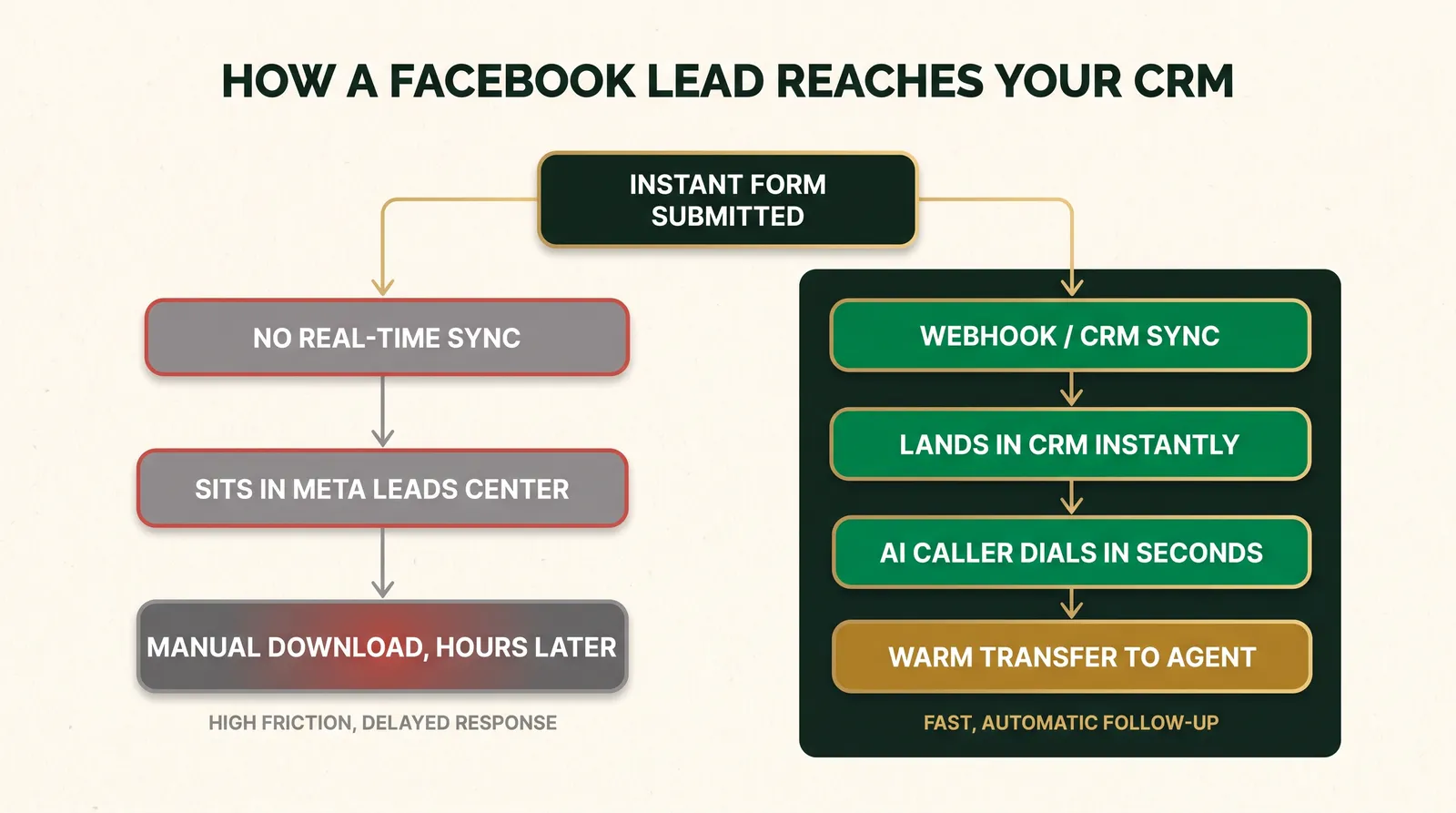
- A Facebook or Instagram Instant Form submission does not arrive at your CRM automatically. It lands in Meta's Leads Center, and reaches you only through a manual download, a scheduled API pull, or a real-time webhook or CRM integration you have to set up on purpose.
- The most common failure isn't a missing integration, it's a broken one: expired Facebook access tokens and Page-admin permission changes can silently stop a working sync without any alert.
- An Instant Form submission is not, by itself, guaranteed to meet the TCPA's prior express written consent standard for an automated call. Meta's Custom Disclaimer field is the tool to fix that, and most agencies never use it.
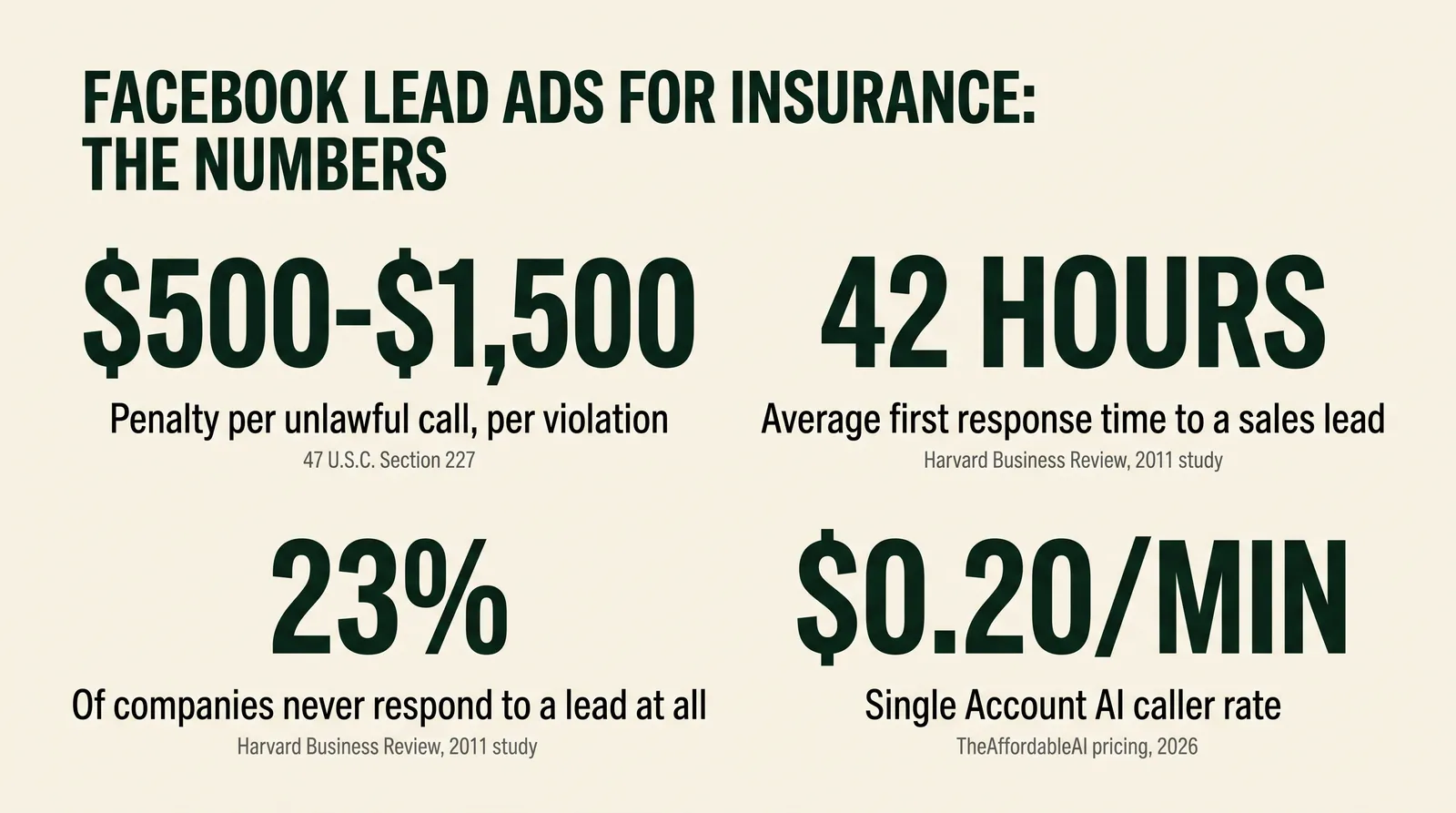
- Unlawful automated calls carry statutory damages of $500 per violation, tripled to $1,500 for willful violations, under 47 U.S.C. § 227.
- The fix is a wiring problem, not a budget problem: a correctly configured native integration or webhook closes almost all of the gap, whether or not you ever add software on top of it.
What an Instant Form Actually Is
An Instant Form, sometimes still called a Lead Ad, is a native form that opens inside the Facebook or Instagram app itself when someone taps your ad. It never sends the person to your website. Instead, Meta shows a short form with fields it can pre-fill from the person’s own profile, name, email, and phone number among them, and the person taps through and submits without typing much of anything. That’s the mechanic behind the format’s reputation for producing a high volume of leads at a low cost per lead: friction is close to zero.
It’s worth being precise about what that speed actually measures. It tells you how fast a person can submit the form. It tells you nothing about how fast the lead reaches a human who can call them, and those are two completely separate systems that happen to share the word “instant.”
Compare that to a standard website form. A visitor clicks your ad, waits for a landing page to load, types their name, email, and phone into fields that don’t pre-fill, and submits, usually through a form plugin or a page builder wired to your CRM directly. That path has more friction, which is exactly why it usually converts a smaller share of clicks. But it’s also, in most setups, more directly connected: the form submission triggers a webhook to your CRM as part of the page itself, because you built or configured that connection when you built the page. An Instant Form skips the landing page entirely, which is the source of both its advantage and its blind spot. There’s no page of your own in the loop, which means there’s no obvious place for you to have wired a connection, and Meta doesn’t build one for you by default.
The ad objective you choose when you build the campaign matters here too. Meta’s advertising platform offers a “Leads” objective specifically built around Instant Forms, distinct from a “Traffic” or “Sales” objective that would send someone to your own website instead. Choosing Leads is what makes the Instant Form available as a format at all; an agency running a Traffic campaign with a link to a landing page is on an entirely different delivery path, governed by whatever CRM connection exists on that landing page rather than anything described in this article.
Define the terms before you build anything
Instant Form / Lead Ad: Meta's native in-app lead capture form. Leads Center: the dashboard inside Meta Ads Manager and Meta Business Suite where every submitted lead is stored by default. Webhook: an automatic notification Meta's platform sends to a URL you control the moment a new lead is submitted. CRM sync: a pre-built connection, like HighLevel's native Facebook integration, that pulls or receives leads and writes them directly into contact records without you touching a webhook at all.
The Three Ways a Lead Actually Reaches You
Meta’s own Marketing API documentation for lead ads lays out the mechanics plainly: lead data can be retrieved through the Graph API, delivered through a webhook, or accessed by a person inside the Leads Center. None of those three happens automatically just because someone submitted a form. Each one is a distinct path with a different speed, and most agencies are on the slowest one without realizing they had a choice.
| Method | How it works | Typical delay before a human sees it |
|---|---|---|
| Manual download | Someone logs into Ads Manager or Meta Business Suite and exports a CSV of new leads | Whenever someone remembers to check |
| Scheduled API pull | A script or tool calls the Graph API on a timer, a few times a day, to fetch new leads | Minutes to hours, on the schedule you set |
| Webhook or native CRM sync | Meta pushes a notification the instant a lead is submitted; your CRM or endpoint receives it in real time | Seconds, if the connection is live and the token hasn't expired |
An agency running the manual download path isn’t doing anything wrong, exactly. It’s just running the path Meta ships by default, which requires nothing to set up and therefore gets left running long after everyone assumed something faster was in place.
Where the “Instant” Advantage Actually Breaks
Ask most agency owners how their Facebook leads get to their team, and you’ll hear “it’s connected to the CRM.” Check the actual data, and the connection is often either half-built or quietly dead. Three specific failure points show up over and over.
Nobody finished the integration. A form was built, an ad went live, and somewhere in the setup, the CRM connection step got skipped or left for later. HighLevel’s own support documentation for its Facebook and Instagram integration walks through a real setup process: an admin with access to both the Facebook Page and the associated Business Manager account has to authenticate, choose the Page, decide whether to sync all historical leads or only new ones going forward, and map each form field to the matching CRM field. Every one of those is a manual step a person has to complete once. If any step was skipped, or done by someone who has since left the agency, leads keep arriving inside Facebook while the CRM stays empty.
The token expired. Meta’s access permissions for a connected integration aren’t permanent. A Page admin’s role can change, a password reset can invalidate a session, or Meta can require re-authentication after a security review. When that happens, a sync that worked perfectly for months can stop cold with no notification to the agency that anything changed. The ad keeps running, leads keep submitting, and nothing shows up in the CRM until someone finally notices the pipeline looks thin and goes digging.
The form itself was rebuilt. Meta’s own help documentation is explicit that you can’t add a Custom Disclaimer, or make most structural edits, to an Instant Form that’s already live in a running ad; you have to duplicate the form and edit the copy. Agencies that duplicate a form to update ad copy or add a field sometimes don’t realize the new form needs its own CRM mapping done from scratch. The old integration was pointed at the old form.
Multiple Pages or ad accounts split the leads. A growing agency often ends up running ads from more than one Facebook Page, whether because a second office opened, a rebrand happened, or an old Page never got decommissioned. Each Page’s Instant Forms need their own integration connection; a sync set up on Page A does nothing for leads submitted through Page B. It’s easy to assume “the Facebook integration” is a single account-wide setting when it’s actually scoped per Page, and an agency running campaigns from three Pages with one page connected is silently losing two-thirds of its leads to the slow path without any error message telling them so.
Check this today, not after your next audit
Submit a real test lead through your own live ad, using a phone or account you control, and time how long it takes to appear in your CRM. If it's not there within a minute or two, you don't have a working real-time integration right now, regardless of what was set up at some point in the past.
Does a Facebook Form Submission Count as TCPA Consent?
This is the question almost nobody asks before they start dialing, and it deserves a straight answer: not automatically, and the details matter.
The Telephone Consumer Protection Act requires prior express written consent before you place an autodialed or prerecorded call, including an AI voice call, to a cell phone for marketing purposes. The Federal Communications Commission’s own FAQ on the prior express written consent standard describes what that consent has to contain: clear authorization from the specific person to be contacted, using the specific technology disclosed, for the specific seller disclosed, with a statement that consent isn’t required to buy anything. A bare Meta Instant Form, out of the box, tells the person their information will be shared with your business. It does not, on its own, disclose that an automated system may call them, or name who’s calling, or state that consent isn’t a condition of purchase, unless you specifically added that language.
Meta gives you the tool to fix this: a Custom Disclaimer field, documented on its own Business Help Center, that you can add to an Instant Form in addition to Meta’s standard privacy notice. Per Meta’s help documentation, this field exists specifically so advertisers can add a legal notice or consent disclosure, and it can include a checkbox the person has to actively check before the form will submit. The catch is that Meta doesn’t write TCPA-compliant language for you; the field is a blank text box. An agency has to put the right words in it, and most never do, either because they didn’t know the field existed or because whoever built the ad campaign wasn’t thinking about consent at all.
Statutory damages for an unlawful automated call, per violation
Source: 47 U.S.C. § 227(b)(3), via Cornell Law School's Legal Information Institute.
The statute allows recovery of actual monetary loss or the statutory amount, whichever is greater, per violation. A court may treble the award for willful or knowing violations.
This isn’t a reason to avoid Facebook leads. It’s a reason to treat the form itself as part of your compliance setup, not just your ad creative. The McCarran-Ferguson carve-out in the FTC’s Telemarketing Sales Rule exempts insurance telemarketing that’s already regulated by state law from separate federal TSR obligations, but that exemption runs through the TSR specifically; it does not touch the TCPA’s own consent requirements, which apply regardless of what line of business you’re in.
There’s also a documentation problem worth naming, separate from the wording problem. Even a well-worded disclaimer is only useful if you can prove, later, that a specific lead saw it. Keep a dated record of exactly which version of the form’s disclaimer text was live on the date a given lead submitted, since Instant Forms can be duplicated and edited over a campaign’s life, and a form you’re running today may not be the one a lead from three months ago actually saw. Meta’s Leads Center retains the submission itself with a timestamp; pair that with your own archive of form-version history so you can answer, specifically, what a specific lead agreed to and when.
Using AI does not transfer liability
Whether a lead is called by a human or an AI voice agent, the licensed agent and agency stay responsible for consent, disclosure, and opt-out obligations, and for Medicare business, the CMS marketing rules including the TPMO disclaimer and call-recording retention. A vendor's technology does not carry any of that responsibility away from you. Work with your own counsel on the exact consent language your Instant Forms need; this article describes the mechanism, not a compliance guarantee.
What This Actually Costs You
Two different costs stack on top of each other here, and they’re worth separating because one is a compliance exposure and the other is a pipeline problem.
The compliance side is the statutory penalty structure above: $500 per unlawful call, tripled for willful violations, with no aggregate cap named in the statute. A vendor claiming your lead’s Instant Form submission automatically covers you legally is a claim worth verifying yourself against your own form’s actual disclosure language, not taking on faith.
The pipeline side is older and better documented, if a little dated: the widely cited 2011 Harvard Business Review study “The Short Life of Online Sales Leads,” by James Oldroyd, Kristina McElheran, and David Elkington, audited response times at 2,241 U.S. companies and separately analyzed 1.25 million sales leads. The findings, even fifteen years old, describe a pattern that hasn’t required new data to still be believable: only 37% of companies in the audit responded to a test lead within an hour, 23% never responded at all, and the average first response time, among companies that responded within thirty days, was 42 hours. That’s one study, conducted in 2011, and we could not locate an independently replicated dataset using the same methodology; treat the exact percentages as illustrative of a pattern rather than a current benchmark, and measure your own agency’s numbers rather than assuming they match.
$500
Statutory damages per unlawful automated call
Source: 47 U.S.C. § 227(b)(3)
$1,500
Maximum per violation for a willful or knowing violation
Source: 47 U.S.C. § 227(b)(3)
42 hrs
Average first response time to a sales lead
Source: Harvard Business Review, 2011
23%
Of companies audited never responded to a lead at all
Source: Harvard Business Review, 2011
For context on the more current, insurance-specific cost side of paid leads, see this site’s own breakdown of Facebook and Google lead costs, which covers 2026 cost-per-lead benchmarks this article doesn’t repeat.
How to Fix It: Wiring an Instant Form So Nothing Sits
None of this requires new software. It requires finishing a setup most agencies started and never verified. Here’s the full method, with nothing held back.
- Confirm which delivery path you’re actually on. Log into Meta Ads Manager, open the Leads Center for the ad account, and check whether a CRM integration shows as connected and active, not just configured at some point in the past. If you’re not sure, submit a real test lead and time how long it takes to show up anywhere else.
- Connect a native CRM integration if one exists for your platform. If you’re on HighLevel, go to your sub-account’s Settings, then Integrations, select the Facebook and Instagram card, and click Connect. You’ll need admin access to both the Facebook Page and its Business Manager. Choose whether to sync all historical leads or new leads only, then map every form field, name, phone, email, and any custom questions, to the matching CRM field. An unmapped field doesn’t sync; it just gets dropped.
- If no native integration exists, set up a webhook. Meta’s Marketing API lets you subscribe to lead-ad webhooks so your endpoint gets notified the instant someone submits a form; you then retrieve the full lead data through the Graph API. This takes developer time to build correctly, which is exactly the gap tools like Zapier or a CRM’s built-in connector exist to skip.
- Fix the consent language on the form itself, not just the delivery pipe. Duplicate your live Instant Form, since Meta doesn’t allow editing a disclaimer on a form already running in an ad, and add a Custom Disclaimer with language your counsel has approved for an automated call: who’s calling, that automated technology may be used, and that consent isn’t a condition of purchase. Point your ad at the new form once it’s live.
- Test the whole chain with a real submission, phone call included. Submit a test lead, confirm it lands in the CRM within moments, confirm any workflow or automation it should trigger actually fires, and confirm a real outbound call, whether placed by a person or an AI caller, goes out promptly and reflects the disclosure your new form promised.
- Put a monthly check on the calendar. Access tokens expire, admins change roles, and forms get duplicated for new campaigns. A five-minute check, submit a test lead, confirm it arrives, catches a silent break long before a quarter’s worth of leads has gone stale in the Leads Center.
Hear how fast a connected lead gets called
There's a live demo call on the homepage. Put your number in and see how quickly an AI caller can reach a lead the moment it's created.
A Worked Example: Two Timelines for the Same Lead
Picture a prospect named Dana, on Instagram at 9:40 on a Tuesday morning, who taps an ad for Medicare Advantage plan comparisons. The Instant Form pre-fills her name and phone from her profile. She sees a Custom Disclaimer that says, plainly, who’s calling, that the call may use automated technology, and that saying yes isn’t required to get information. She checks the box and submits.
On the manual path, that submission lands in the agency’s Leads Center and stays there. Nobody’s watching it in real time; the office assistant does a CSV export around 4 p.m., because that’s when it’s always been done. Dana’s lead is one of thirty in that afternoon’s batch. Someone gets to her name around 4:45, calls once, gets no answer, and moves to the next row. By the time anyone tries again, two days have passed, and Dana has already talked to a different agent whose ad she also happened to see.
On the wired path, the same submission triggers a webhook the instant she taps submit. It lands in the CRM before she’s closed the app. An outbound call fires within moments, she picks up because she’s still holding her phone, and after a short qualifying conversation she’s warm-transferred to a licensed agent who can actually answer her plan questions, all inside the same ten minutes her original attention was on the ad. The disclaimer she checked ten minutes earlier is exactly what authorized that call.
Nothing about Dana changed between those two versions. The ad spend was identical. The only variable was whether anything was listening for her submission the moment it happened.
More Volume vs Higher Intent: Which Form Type to Run
Meta’s own Business Help Center documents more than one Instant Form type, and the choice affects how your follow-up system should be built, not just how many leads you get. A standard form, sometimes labeled More Volume, lets someone submit as soon as the pre-filled fields look right. A Higher Intent form adds a review step: the person sees their answers laid out and has to actively confirm before the form submits, which catches accidental taps and people who back out mid-thought.
| What you're comparing | Higher Intent form | More Volume form |
|---|---|---|
| Extra step before submit | Yes, a review screen the person must confirm | No, submits immediately once fields are filled |
| Best fit when follow-up is | Slower, or handled by a small team watching volume | Instant, with capacity to call every submission fast |
| Where the Custom Disclaimer sits | Same field, visible on the review screen too | Same field, on the single-step form |
Neither type is inherently better; they’re matched to different follow-up capacities. An agency that can genuinely call every lead within moments loses little by running More Volume, since the extra submissions get worked at the same speed as everything else. An agency still relying on someone checking a CSV a few times a day is better served narrowing intake with a Higher Intent form until the pipe itself is fixed.
Where TheAffordableAI Fits
We don’t build or manage your Facebook ad campaigns, and nothing above requires our product to work; a correctly wired native integration and a disciplined team can run this whole system without us. What we do is remove the part that depends on a human noticing a new lead arrived. TheAffordableAI’s outbound caller fires the moment a lead lands in your CRM, whether it came from a Facebook Instant Form, a website form, or any other source synced through HighLevel, and dials it immediately rather than waiting for a batch job or a person with free time.
Fires on lead creation
The outbound dial triggers the instant a synced lead hits the CRM, not on a schedule or when someone gets around to it.
Warm transfer to a licensed agent
A qualified, willing prospect is connected live to your team on the same call, instead of dropping a callback task.
Native HighLevel sync
Transcript, disposition, and tags land on the contact record automatically, on the same platform that already connects to Facebook.
24/7 coverage
Facebook and Instagram ads run around the clock; a lead submitted at 10 p.m. gets called at 10 p.m., not the next business morning.
What You Actually Get
A working chain looks like this: someone taps your ad, fills a pre-filled Instant Form with consent language your counsel approved, and within moments their phone rings. If they’re a fit and willing to talk further, the call transfers live to whichever licensed agent is available, and the whole interaction, transcript and disposition included, is already sitting on their contact record in HighLevel before anyone on your team has had to lift a finger. Nobody had to notice the lead. Nobody had to remember to check a dashboard. The mechanical part of the job, dialing the instant a lead exists, happened by itself, and the part that requires a license, advice and the sale, went to a human.
What “Good” Looks Like, Checked Monthly
Default Facebook lead ad setup
- Leads sit in the Leads Center until someone remembers to check
- Default form disclosure only, no automated-call language
- One Page connected; a second Page or new ad account isn't
- No record of which disclaimer version a given lead actually saw
- A broken sync fails silently, discovered only when volume looks thin
Checked, connected, documented
- Webhook or native CRM sync pushes every lead in real time
- Custom Disclaimer names the caller, the technology, and the opt-out
- Every Page and ad account has its own confirmed integration
- Form-version history archived alongside each lead's submission timestamp
- A monthly test lead confirms the whole chain still fires
Where This Is the Wrong Tool
Be honest about the limits. If your ad account has fewer than a handful of leads a week, building a webhook or paying for a managed caller to shave hours off a call you’d have made that same afternoon anyway is more infrastructure than the problem justifies; a native CRM integration alone, checked weekly, is probably enough. And if your actual bottleneck is ad performance, not follow-up speed, none of this fixes a demand problem; a perfectly wired integration calling three leads a week isn’t going to grow a book. This article is about closing the gap between when a lead submits and when your business finds out about it. If that gap is already small, look elsewhere for your next improvement.
The lead was never slow. The pipe carrying it to you was.
Mike MooreFacebook and Instagram did their part the moment someone tapped submit. Whether that speed survives the trip to your phone is entirely a wiring decision your agency makes, or fails to make, long before the ad ever runs. Fix the pipe once, get the consent language right on the form itself, and the “instant” in Instant Form starts meaning something past the moment of submission. You can build every piece of that yourself with a native integration and a disciplined check-in habit, or point the last mile, the outbound call itself, at a system that never forgets to check. Either way, price it against what a lead sitting in the Leads Center for two hours is actually costing you this month.
Frequently asked
Does submitting a Facebook Instant Form count as TCPA consent to call?
Not automatically. Meta's default Instant Form only confirms the person wants to share their contact information with your business; it does not, by itself, contain the specific disclosures the TCPA requires for an autodialed or prerecorded call, such as who is calling, that automated technology may be used, and that consent is not a condition of purchase. Meta gives you a Custom Disclaimer field for exactly this reason. If you never added one, the lead may be a legitimate business contact but a legally thin basis for an automated call, and you should treat it accordingly until your form language says otherwise.
What's the fastest way to connect Facebook leads to a CRM?
A native, real-time integration beats a manual download every time. If you use HighLevel, its built-in Facebook and Instagram integration under Settings, Integrations syncs new lead-ad submissions automatically once it's connected and your form fields are mapped to CRM fields. If your CRM doesn't have a native Meta connector, the fallback is a webhook subscription through the Marketing API, which notifies your endpoint the moment a lead is submitted, or a middleware tool like Zapier that watches for new leads and pushes them over. A scheduled CSV export is the slowest option and the one most agencies default to without meaning to.
Why do my Facebook leads sit for hours before anyone calls them?
In most cases, no real-time delivery method is actually connected. Meta stores every lead in the Leads Center whether or not you have an integration, and makes it available for manual download or periodic API pulls, but nothing pushes it anywhere on its own unless you've set up a webhook or a CRM integration. An expired access token is the other common cause: a sync that worked in January can go silent in June if the Facebook Page admin's permissions lapsed, and nothing alerts you when it does.
Should I use More Volume or Higher Intent forms for insurance leads?
It depends on what your follow-up system can absorb. A Higher Intent form adds a review screen where the person sees their answers and has to confirm before submitting, which filters out accidental taps and people who bail mid-form. A More Volume form skips that screen and produces more submissions with less friction. If you're calling every lead within moments regardless of form type, More Volume gives you more at-bats. If your follow-up is slower or handled by a smaller team, Higher Intent reduces the number of low-effort submissions you're chasing.
What happens to a Facebook lead if I never set up any integration?
It doesn't disappear, but it also doesn't come to you. Meta keeps it in the Leads Center inside Meta Ads Manager, where someone has to log in and either download a CSV or view it manually. Depending on your ad account's settings, leads may also be reachable a few times a day through the Graph API, but that's a scheduled pull, not a push. Either way, the lead sits until a person goes and gets it, which is exactly the gap this article is about closing.
Is an AI caller compliant for following up on Facebook insurance leads?
It depends on how the lead was captured and how the caller is configured, not on the fact that it's AI. You still need prior express consent adequate for an automated call, clear disclosure that the caller may be automated, an honored opt-out, and, for Medicare business, current CMS marketing rules including the TPMO disclaimer and call-recording retention. The AI can qualify and schedule; a licensed agent still has to give advice and complete the sale. None of that changes because the lead source was Facebook instead of a website form.
Does Meta's Custom Disclaimer field satisfy TCPA's written consent requirement on its own?
Only if the language you put in it actually says what the TCPA requires. The field itself is just a text box Meta lets you add to an Instant Form; Meta does not supply TCPA-compliant wording for you, and a generic privacy notice is not the same thing as express written consent to receive autodialed or prerecorded calls. Work with counsel on the exact language, then use the Custom Disclaimer field to place it in front of every prospect before they submit.
How much does automating Facebook lead follow-up cost?
A managed AI caller like TheAffordableAI runs $200 a month plus a $500 one-time setup on the Single Account plan, at $0.20 a minute, or $500 a month plus a $1,000 one-time setup on the Agency plan, at $0.18 a minute, both with no long-term contract. Verify current numbers on the pricing page before you budget, since published rates can change. The other real option costs staff time instead of a subscription: a native CRM integration plus a person watching for new leads all day, which works fine until that person is at lunch, in a meeting, or gone for the weekend.
Sources
- Meta for Developers — Marketing API, Lead Ads Guide (webhooks, CRM integrations, Leads Center, Graph API retrieval)
- Meta Business Help Center — About Instant Form Types
- Meta Business Help Center — Add a Custom Disclaimer to Your Instant Form
- HighLevel Support — Step-by-Step Guide to Facebook Integration in HighLevel
- Federal Communications Commission — One-to-One Consent Rule for TCPA Prior Express Written Consent, Frequently Asked Questions (posted December 23, 2024)
- Cornell Law School Legal Information Institute — 47 U.S.C. Section 227, Telephone Consumer Protection Act, statutory damages
- Federal Trade Commission — Complying with the Telemarketing Sales Rule, insurance business exemption under McCarran-Ferguson
- Harvard Business Review — "The Short Life of Online Sales Leads" by James B. Oldroyd, Kristina McElheran, and David Elkington (March 2011)
- TheAffordableAI — Pricing
Put this on your own phone line
See the AI dial, qualify, and warm-transfer a live call in under a minute. No contract, no dev work.
Keep reading

Facebook vs Google Ads for Insurance Leads in 2026
Facebook and Google leads behave differently for insurance agents. Sourced 2026 cost benchmarks and the follow-up system each lead type actually needs.

GoHighLevel Insurance Workflows: Trigger to Warm Transfer
Most GoHighLevel insurance workflows stop at 'assign the lead.' Here's the trigger-to-warm-transfer build, GHL's own docs, and where TCPA rules bite.

Speed to Lead in 2026: Why the First 60 Seconds Decides Who Writes the Policy
The lead you paid for is not lost to a better agent. It is lost to a faster one. Here is what response time actually does to contact and conversion rates, and how to get to sixty seconds without hiring a dialer team.